Start with a fast daily unit of work
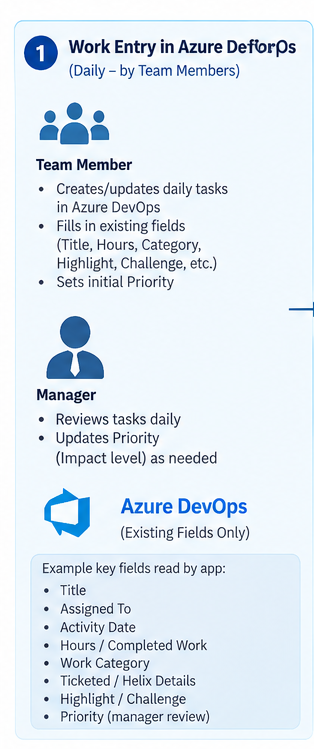
Use Task as the daily unit of work. Create an inherited Azure DevOps process, customise the Task work-item type, arrange the form around the fields used most often, create shared queries, and pilot the process before a wider rollout. A normal entry should take about 30–60 seconds.
Create an inherited process
Start from the system process already used by the team, then use it in a pilot project.
Customise Task
Add only the fields that support a later report, review or learning conversation.
Create shared queries
Useful starting queries include My Work Today, Team Today, Pending Manager Review, Weekly Highlights and Automation/Learning.
Pilot, then adjust
Check whether the form is genuinely quick and whether the data is helping before broad rollout.
Recommended fields
| Core fields | Optional context |
|---|---|
| Title; Description; Activity Date; Hours / Completed Work; Work Category; Priority | Helix Type; Helix Reference; Highlight; Challenge; Tags |
Do not add redundant boolean fields such as IsHighlight, HasChallenge or Ticketed. Text in Highlight or Challenge already indicates its presence; a Helix reference already indicates ticket linkage.
Work categories provide context
Work Category describes the nature of a contribution. It is not a measure of employee value and should never be used to imply that one type of work always matters more than another.
| Category | Examples |
|---|---|
| BAU Support | Service checks, operational support and routine fixes. |
| Incident / Problem Investigation | Diagnosis, root-cause analysis and workaround design. |
| Analysis | Impact assessment, technical investigation and solution options. |
| Project Work | Planned delivery, migration and enhancement work. |
| Change / Release | Deployment preparation, validation and release support. |
| Automation | Health checks, scripts and repeatable process improvements, linked to the Azure Repos code, pipeline, runbook or original problem where relevant. |
| Documentation | Runbooks, SOPs and technical guides. |
| Monitoring | Alerts, dashboards and observability improvements. |
| Testing / Validation | Test execution, integration checks and production validation. |
| Knowledge Sharing | Demos, walkthroughs, mentoring and reusable lessons. |
| Learning / Research | Structured learning and technology evaluation. |
| Process Improvement | Removing friction, improving handovers and reducing waste. |
For automation, record what changed, why it mattered and where the reusable asset lives. A simple link to the repository, pull request, pipeline, runbook or related work item makes the improvement easier for the next engineer to find and use.
Manager review
The manager does not need to rewrite a task. Review the relative importance or impact when useful, adjust priority where needed, and preserve judgement for the later discussion. The aim is useful context, not administrative overhead.